 TRONOXAWallet FAQ
TRON network fees
How much does it cost to send USDT on TRON?
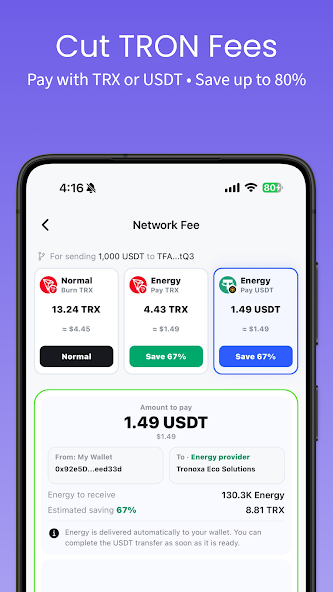
A TRC20 USDT transfer uses Energy. Your available resources and the Energy required for the transfer affect the quote. Enter the recipient and amount in TRONOXA to see your options before signing.
A 1,000 USDT example
| Option on the fee screen | Estimate shown |
|---|---|
| Standard · burn TRX | 13.24 TRX |
| Energy · pay in TRX | 4.43 TRX |
| Energy · pay in USDT | 1.49 USDT |
Check the fee and complete your transfer
- Choose USDT on TRON and enter the recipient address and amount.
- On the Network Fee screen, compare the standard option with the available Smart Energy quotes.
- If you select Energy, review the payment currency and network, then sign the separate Energy payment on your device.
- Once Energy arrives, review the recipient and amount again, then sign the USDT transfer.